
Equations showing up as plain text usually need two separate checks: did the page load MathJax, and did it receive the syntax that renderer expects? This began as a 2019 MathJax-LaTeX setup note; the syntax below was checked again on September 13, 2026.
Table of Contents
1. Check the existing installation
For an existing MathJax-LaTeX installation, open its settings and check how MathJax is loaded. For a new site, first check compatibility on staging: the WordPress plugin directory currently warns that this plugin has not been tested with the latest three major WordPress releases. Do not install a second equation renderer just to fix one post.
2. Choose whether to force-load MathJax
Without Force Load, a post using only native MathJax delimiters needs to request the script. Put this shortcode anywhere in that post:
[mathjax]The plugin’s nomathjax shortcode disables its script for the whole page, not just the following section. Do not put it into a post whose equations you want rendered. The plugin’s own latex shortcode also requests MathJax; plain dollar signs alone do not.
The Use wp-latex syntax option enables this compatibility form:
$latex E=mc^2$It does not enable arbitrary single-dollar inline math such as $E=mc^2$. That is a separate MathJax delimiter setting. The plugin source shows the loading flags and the special wp-latex conversion.
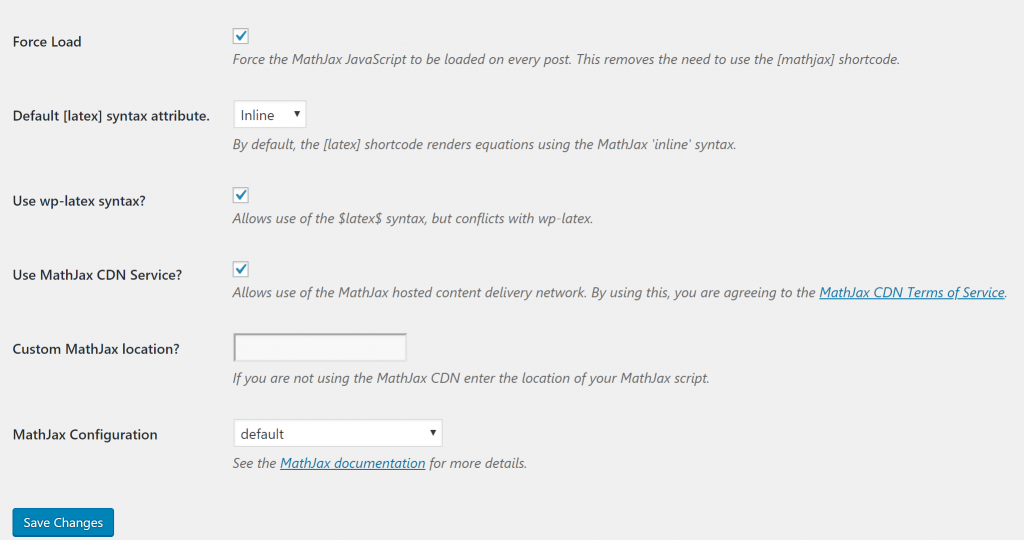
The archived screenshot is a settings reference, not a compatibility test for your current installation.
3. Test equation syntax
Test these three native forms in a draft: the first two are display math; the third is inline math. Paste them into content intended for typesetting, not a Code block, which should keep examples literal.
$$E=mc^2$$
\[E=mc^2\]
\(E=mc^2\)
These are the defaults documented for MathJax 2 and current MathJax; a site can override them. MathJax-LaTeX 1.3.13 belongs to the MathJax 2 integration, so do not paste a newer configuration into its settings unchanged.
This blog now uses a different MathJax integration, rather than these old plugin settings. Its display output is:
If the equations appear as plain text, check the following points:
- Preview the saved page, not only the editor. Check that the backslashes survived and the formula is outside a code example.
- In the browser’s Network panel, look for the MathJax script and failed requests. Fix a blocked or missing script before changing equation syntax.
- Check the active renderer’s delimiters, the loading setting and any page-wide disable shortcode. Change one thing at a time on staging.
- Clear only the affected page’s cache after a change, then check a fresh browser tab and a narrow screen. Keep the previous configuration so the change can be undone.