
I had already paid for SPIE Student Membership, but registration for SPIE Future Sensing Technologies 2026 still showed US$700. The same form advertised US$400 for Student Members. I thought my membership had not been recognized.
The membership was fine. The missing step was a separate checkbox under Onsite Info → Are you a Student? Selecting it changed the displayed total to US$400.
These are the prices I saw on 14 October 2026, not a price list for every SPIE conference. The screenshots below show only the relevant form sections; account and payment details are excluded.
Table of Contents
What I checked first
The membership receipt showed Student — 1 Year, paid in full for US$20. In My Account → Membership Status, the membership type was already Student Member, with an expiry date after the conference.
Buying another membership would not have fixed this. The conference form needed its own student declaration.
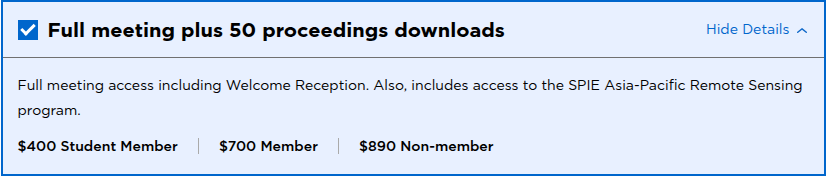
The published options in the registration form on 14 October 2026.
The steps that applied the student rate
- Sign in with the same SPIE account used to buy Student Membership.
- Open the conference registration and choose full-meeting access.
- Complete Your Info, then open Onsite Info.
- Under Are you a Student?, select “Yes, I certify that I am a student as defined above.” The form defines an eligible student as an enrolled undergraduate or graduate student who has not yet received a PhD or MD (terminal degree).
- Enter your actual projected graduation month and year.
- Check the displayed total and the final review before paying. In this case, the total changed immediately from US$700 to US$400.
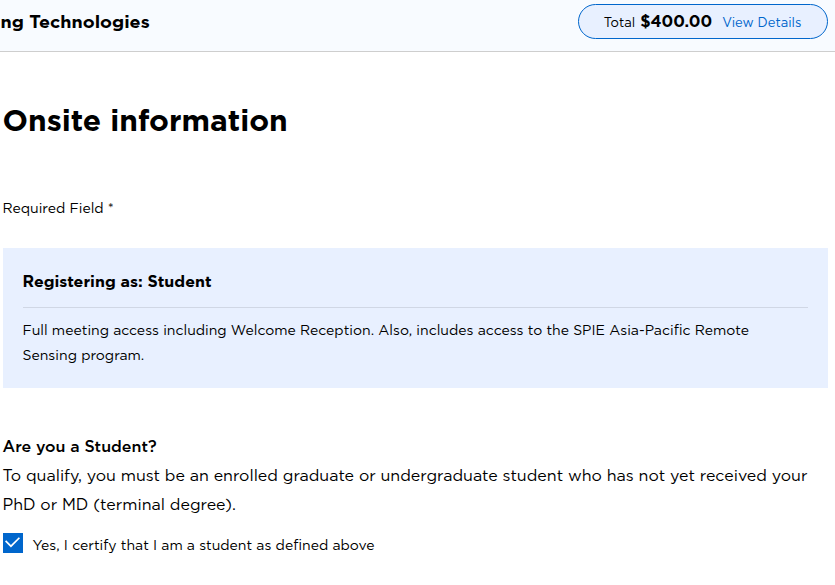
The checked student declaration and the resulting US$400 total. Selecting the box does not complete payment.
What about “Non-author attendee”?
That label was part of my initial confusion, but I could not reproduce it in the signed-in check. Before selecting the student box, the form recognized me as Speaker/Author. After selecting it, the displayed registration category became Student.
Three things are worth checking separately:
- Active Student Membership: My Account → Membership Status.
- Student registration rate: Onsite Info → student declaration, then the total.
- Accepted presentation: the account’s submission tasks and presentation details.
If your form still says Non-author attendee, check that the accepted paper is visible in that same account. If the paper is missing, or the student price still does not apply, contact customerservice@spie.org with the relevant details privately. The unchecked student box explained my pricing issue; it does not establish why another account might have an author-status mismatch.
Official links
For this registration, the useful check was simple: active Student Membership plus the student declaration in Onsite Info. The US$400 total was visible before completing checkout.