
An unfamiliar character can turn a few minutes of reading into a trip through several tabs. You look up a pronunciation, check a translation, then return to the book and find your place again. A translation on its own solves a different problem: you can follow the story, but the original wording disappears.
I built Bunko to keep those things together: the original passage, readings above the characters, and another language nearby when you need it. It is a small reader for Chinese, Japanese and English classics, not a course you have to work through before opening a book.
Table of Contents
Keep the sentence in view
Here is a page from Natsume Sōseki’s Sanshirō. The Japanese stays on the page, with furigana above characters and an English study rendering below each passage. You can follow where a sentence begins and ends without jumping to a separate translation.
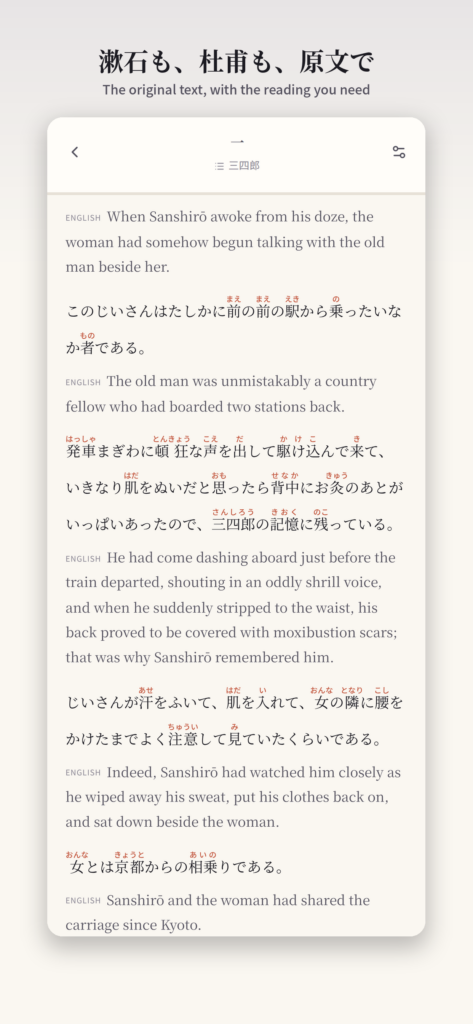
Bunko’s Japanese reading view. The English text is an AI-generated study rendering, not a published literary translation.
Furigana answers a pronunciation question. Parallel text offers a possible meaning. Neither does all the work of reading, and separating those jobs is useful. You may only need a reading for one word; there is no reason to replace the whole sentence with English.
For Chinese passages, Bunko shows pinyin above the characters. In Classical Chinese, that is a modern Mandarin reading aid, not a reconstruction of historical pronunciation. You still need to work out what a word is doing in its sentence.
Read a little, then remove some help
Start with one paragraph rather than a chapter. Keep the readings visible and try to follow the original before looking at the parallel text. If you get stuck, compare the corresponding passage, then return to the original and see which words carry the meaning.
On a second pass, try the source-only arrangement. Hide the readings if they are pulling your eyes away from the characters. Bunko lets you change the displayed languages and choose interlinear or paragraph-by-paragraph layouts, so you can keep only the help you need.
This is a reading suggestion, not a tested learning programme. A troublesome word is still worth checking in a dictionary or an annotated edition. Bunko’s study renderings are AI-generated and can be wrong; they should give you something to compare with the original, not settle an interpretation for you.
Carry the passage with you
Download a book while connected, then read the saved chapters offline. Your reading position and preferences stay on the device. There is no account to create, and the app has no ads or subscription.
The library draws on public-domain source works, with book bundles available in the project’s public repository. The Bunko source and catalogue notes explain how the reader and library fit together. Public-domain status can differ by country, so check the source and local rights before reusing a text elsewhere.
Bunko: Classics with Ruby is on the App Store. The US price is $0.99 once, with no in-app purchases. Choose one passage you actually want to read; the rest of the library can wait.