
2026 maintenance note. The 2019 post recorded two real installation problems, but it did not define a bridge or contain working code. This edition builds a new, title-led tutorial around that short record. It preserves the complete original export at the end and treats its Visual C++ 2015 statement as build-specific, not a universal 2026 prerequisite.
ZeroMQ can carry messages between a MetaTrader 4 Expert Advisor (EA) and Python, but it is only a transport. It does not define a protocol, make an untrusted process safe, recover an ambiguous order, or make a strategy profitable. The example below deliberately implements only a local health request. It is suitable for learning transport behavior; it is not a live-trading system.
Table of Contents
1. Scope and safety contract
Use this guide first with an offline terminal or a demo account. Keep automated trading disabled while testing the transport. The sample:
- binds only to IPv4 loopback,
tcp://127.0.0.1:5557; - accepts one allow-listed operation,
health; - sends no credentials, account identifiers, prices, or orders;
- uses bounded messages, waits, queues, retries, and shutdown;
- retries one immutable request ID so the server can deduplicate it;
- makes no claim about returns or execution quality.
Enabling Allow DLL imports grants native code the privileges of the terminal process. Only load a DLL whose source, build, architecture, dependencies, and checksum you have verified. A copied DLL is a code-execution boundary, not merely a connector.
2. Architecture and trust boundary
A conservative split keeps trading authority in MT4:
market / broker
      |
      v
MT4 terminal -> EA policy gate -> reviewed MQL4-to-libzmq adapter
                                    || loopback, fixed protocol
                                    \/
                              Python worker
                         analytics / health only
MT4 owns terminal state, tick timestamps, account mode, risk limits, and any eventual order submission. Python may calculate or answer health checks, but its reply is only an input to the EA’s local policy. Never interpret “a ZeroMQ reply arrived” as “the command is safe to execute.”
The boundary has three independently versioned parts: MQL4 declarations, the native adapter/libzmq binary, and Python/pyzmq. A mismatch can crash the terminal even when the Python code is correct. The MQL4 compiler cannot fully validate external function parameters, and MetaQuotes documents that imported DLLs run in the calling module’s thread.
3. Configure the MT4 DLL without guessing its runtime
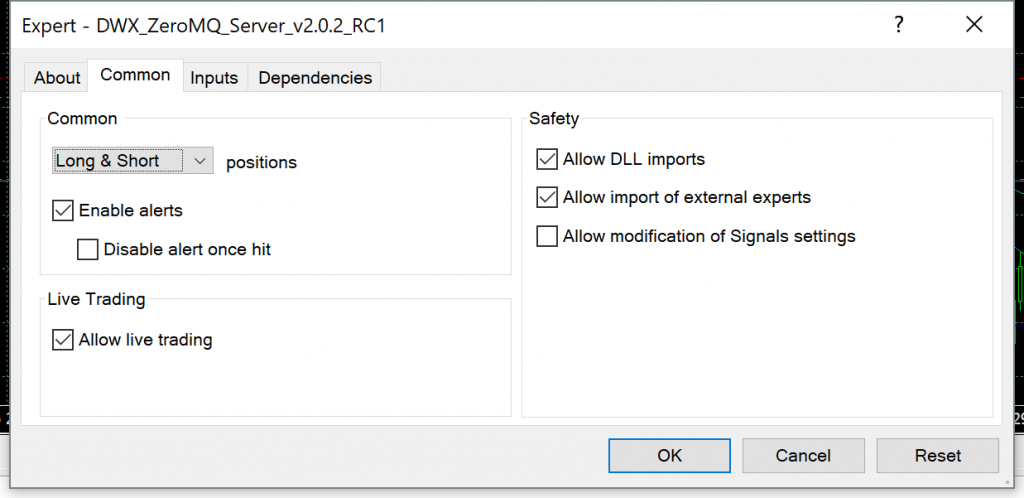
The archived note says to install the Microsoft Visual C++ 2015 Redistributable. That may be correct for the particular 2019 libzmq.dll, but the real rule is: install the runtime required by the exact binary you audited. A modern build might use a different Microsoft runtime or be statically linked.
Before loading the EA:
- Match terminal and DLL architecture; do not rename a binary to hide a mismatch.
- Put the reviewed library in the terminal’s documented
MQL4/Librariessearch path and verify every dependent DLL. - Match each MQL4
#importsignature and calling convention to the adapter ABI. Prefer a small reviewed adapter over exposing a broad C API directly. - Enable Allow DLL imports only for this reviewed EA. At runtime, fail closed if
IsDllsAllowed()is false. - Inspect the Experts and Journal logs. MetaQuotes says a missing or blocked DLL stops the EA until reinitialization.
Do not download an arbitrary “MT4 ZeroMQ bridge” solely because its filename matches this tutorial.
4. Drive the bridge from OnTimer, not OnTick
OnTick() is for new quotes, not a reliable message pump. MetaQuotes documents that a new tick is ignored when an earlier OnTick() is still running. A blocking receive inside that handler can therefore make market data stale and freeze other EA work.
Create one timer in OnInit(), perform a small bounded/non-blocking bridge step in OnTimer(), and remove the timer in OnDeinit(). MT4 has one timer per program, and it does not queue another timer event while one is already queued or executing. That is useful backpressure, but it also means every timer handler must finish quickly. Do not share one ZeroMQ socket across event-handler and worker threads; libzmq documents ordinary REQ/REP sockets as not thread-safe.
5. Define an exact multipart protocol
ZeroMQ preserves multipart-message atomicity but does not invent an application schema. This guide uses exactly two application-visible frames:
| Frame | Bytes | Rule |
|---|---|---|
| 0 | 7 | literal ASCII LZMT4/1 |
| 1 | at most 65,536 | UTF-8 JSON; strict object; no duplicate keys, NaN, or infinity |
Request schema (no extra keys):
| Field | Type and constraint |
|---|---|
schema |
literal lazying.mt4.bridge.request |
version |
integer 1 |
request_id |
UUID string; unchanged across retries |
client_id |
1–64 ASCII letters, digits, ., _, or - |
session_id |
UUID string; new for a deliberate client session |
sequence |
positive integer, starting at 1 and increasing by one |
sent_at_utc |
RFC 3339 UTC timestamp ending in Z |
max_age_ms |
integer from 100 through 60,000 |
operation |
literal health in this version |
payload |
empty JSON object |
The reply also has exact keys: schema, version, the three correlation values (request_id, session_id, sequence), status, processed_at_utc, result, and error. A valid success has status: "ok", an object in result, and error: null. A rejection has status: "error", result: null, and an error object containing a stable code and a safe message. Correlation values may be null only when the request could not be decoded.
Never use send_pyobj() or recv_pyobj() across this boundary. PyZMQ documents that they rely on Python pickle, and decoding untrusted pickle data can execute arbitrary code.
6. Define price and time freshness separately
There are at least three different clocks:
MqlTick.timeis the server timestamp attached to the latest known tick for one symbol.TimeCurrent()inOnTimer()is the last known server time for any symbol selected in Market Watch; it is not proof that the requested symbol just traded.- a monotonic clock measures local elapsed time for timeouts, but cannot timestamp an event on another machine.
An eventual price message should therefore carry symbol, bid, ask, tick_server_time, terminal_received_at_utc, and a validity horizon. The EA must compare the named symbol’s latest tick with its own current terminal state immediately before acting. A Python wall-clock timestamp is not evidence that a quote is fresh. Reject future timestamps beyond a small declared skew and reject messages older than their max_age_ms; synchronize both hosts if the bridge is not on one computer.
The health example checks UTC age, while measuring retry delays with a monotonic clock. It carries no price.
7. Understand the REQ/REP failure state
REQ/REP is a lock-step state machine: REQ sends then receives; REP receives then sends. After a REQ timeout, trying to send another message on that same strict REQ socket violates the state machine. Recreate the socket, reconnect, and resend the same serialized request with the same request_id.
A difficult but normal case is:
- Python sends a request.
- The server processes it.
- The reply is delayed or lost.
- Python times out and cannot tell whether processing occurred.
That is why transport retries require application-level idempotency. The server below caches successful replies by (client_id, session_id, request_id) and rejects reuse of an ID with different bytes. It checks sequence order only after checking the cache, so a true retry receives the earlier reply. This in-memory cache is enough for a health demo, not for orders: a production executor needs a durable ledger and reconciliation against MT4’s authoritative state.
libzmq also offers relaxed/correlated REQ options in supported builds. The official documentation warns that relaxed mode discards earlier replies and should be paired with correlation to avoid accepting a late reply for a newer request. This example stays with strict REQ and explicit socket recreation so the failure behavior is visible.
8. Bound queues, waits, and shutdown
Set connection-related socket options before connect() or bind():
| Control | Example policy | Reason |
|---|---|---|
RCVTIMEO, SNDTIMEO |
600 ms client | avoid infinite blocking; handle EAGAIN/zmq.Again |
LINGER |
0 on disposable request sockets | make deliberate replacement/shutdown bounded; pending messages are discarded |
SNDHWM, RCVHWM |
10 messages | bound transport queues; exact effective behavior is transport/socket dependent |
MAXMSGSIZE |
65,536 bytes | reject oversized inbound frames in libzmq, backed by application checks |
IMMEDIATE |
1 on client | do not queue outbound data before a connection completes |
RECONNECT_IVL, RECONNECT_IVL_MAX |
100/1,000 ms | bound and back off reconnect attempts |
The default linger is infinite, and timeout defaults are infinite. Do not rely on those defaults for an EA lifecycle. A high-water mark is measured in messages, not bytes, and is not a substitute for the 65,536-byte application limit.
9. Authentication and encryption
Loopback plus a fixed port is the safest starting scope, but another local process may still connect. Add an OS firewall rule and run with a least-privileged account.
For a network crossing, ZeroMQ security mechanisms are not interchangeable:
- ZMTP
NULLprovides no authentication or confidentiality. PLAINsends a username and password without encryption; it is not safe on an untrusted network by itself.CURVEis the ZeroMQ mechanism intended to provide authentication and confidentiality.
Use CURVE only if the exact libzmq build and the MQL4 adapter expose compatible CURVE configuration and you have verified key distribution and server-key pinning. Otherwise, keep the endpoint private and add a separately authenticated encrypted tunnel. Never publish a raw MT4 bridge port to the Internet. Security must protect metadata and keys too; do not log secrets.
10. Idempotency and ordering
Treat these values as different concepts:
request_id: identity of one logical request; stable across its retries.session_id: identity of one intentional client run; changes only when starting a new session.sequence: expected order inside a session; never reset silently.
Cache the response and a hash of the canonical request bytes. If the same ID arrives with different bytes, reject it. If a sequence is skipped or rewound without a matching cached request, reject it. The sample bounds both its reply cache and per-session sequence map to 1,024 entries and 60 seconds. After expiry or eviction, a continuing client must generate a new session_id and start that new session at sequence 1 instead of guessing where the old session left off. This is a client-side contract: the bounded demo server cannot remember every expired ID forever and would otherwise accept sequence 1 under an old ID.
Health checks are naturally harmless. Trading commands are not. Before adding any, define a durable command ledger, an explicit state machine (received, validated, submitted, confirmed, rejected, unknown), and reconciliation with platform tickets/history. Never retry an unknown submission as if it definitely failed.
11. Reconnect, watchdog, and circuit breaker
Transport reconnect is not application recovery. A useful watchdog tracks the last valid correlated reply, consecutive timeouts, socket rebuilds, protocol errors, and last fresh tick per symbol. After a small threshold of missed checks, open a circuit breaker:
- stop accepting new external commands;
- do not close or reverse a position merely because the bridge failed;
- keep observing MT4 locally;
- require a healthy probation period and preferably manual re-arming.
If the Python process, EA, terminal, or computer restarts, create a new session and reconcile durable state before accepting commands. Do not infer state from a TCP reconnection alone.
12. Minimal local health-check protocol
Create these three files in an empty disposable directory. They intentionally contain no order operation.
protocol.py:
from __future__ import annotations

import json
import re
import uuid
from datetime import datetime, timezone
from typing import Any

PROTOCOL = b"LZMT4/1"
MAX_FRAME_BYTES = 65_536
REQUEST_SCHEMA = "lazying.mt4.bridge.request"
REPLY_SCHEMA = "lazying.mt4.bridge.reply"
REQUEST_KEYS = {
    "schema", "version", "request_id", "client_id", "session_id",
    "sequence", "sent_at_utc", "max_age_ms", "operation", "payload",
}
REPLY_KEYS = {
    "schema", "version", "request_id", "session_id", "sequence",
    "status", "processed_at_utc", "result", "error",
}
CLIENT_ID = re.compile(r"[A-Za-z0-9_.-]{1,64}\Z")
ERROR_CODE = re.compile(r"[A-Z0-9_]{1,64}\Z")


class ProtocolError(ValueError):
    pass


def utc_now() -> str:
    return (
        datetime.now(timezone.utc)
        .isoformat(timespec="milliseconds")
        .replace("+00:00", "Z")
    )


def parse_utc(value: str) -> datetime:
    if not isinstance(value, str) or not value.endswith("Z"):
        raise ProtocolError("timestamp must be an RFC 3339 UTC string ending in Z")
    try:
        parsed = datetime.fromisoformat(value[:-1] + "+00:00")
    except ValueError as exc:
        raise ProtocolError("timestamp is invalid") from exc
    if parsed.tzinfo is None or parsed.utcoffset() != timezone.utc.utcoffset(parsed):
        raise ProtocolError("timestamp must use UTC")
    return parsed


def _no_duplicate_keys(pairs: list[tuple[str, Any]]) -> dict[str, Any]:
    result: dict[str, Any] = {}
    for key, value in pairs:
        if key in result:
            raise ProtocolError(f"duplicate JSON key: {key}")
        result[key] = value
    return result


def _reject_constant(value: str) -> None:
    raise ProtocolError(f"non-finite JSON number: {value}")


def encode_object(value: dict[str, Any]) -> bytes:
    try:
        raw = json.dumps(
            value,
            ensure_ascii=True,
            allow_nan=False,
            sort_keys=True,
            separators=(",", ":"),
        ).encode("utf-8")
    except (TypeError, ValueError) as exc:
        raise ProtocolError("object is not strict JSON") from exc
    if len(raw) > MAX_FRAME_BYTES:
        raise ProtocolError("JSON frame is too large")
    return raw


def decode_object(raw: bytes) -> dict[str, Any]:
    if len(raw) > MAX_FRAME_BYTES:
        raise ProtocolError("JSON frame is too large")
    try:
        value = json.loads(
            raw.decode("utf-8"),
            object_pairs_hook=_no_duplicate_keys,
            parse_constant=_reject_constant,
        )
    except (UnicodeDecodeError, json.JSONDecodeError) as exc:
        raise ProtocolError("frame is not strict UTF-8 JSON") from exc
    if not isinstance(value, dict):
        raise ProtocolError("JSON root must be an object")
    return value


def _uuid(value: Any, field: str) -> None:
    if not isinstance(value, str):
        raise ProtocolError(f"{field} must be a UUID string")
    try:
        uuid.UUID(value)
    except ValueError as exc:
        raise ProtocolError(f"{field} must be a UUID string") from exc


def decode_request(parts: list[bytes]) -> tuple[dict[str, Any], bytes]:
    if len(parts) != 2 or parts[0] != PROTOCOL:
        raise ProtocolError("expected exactly two frames with protocol LZMT4/1")
    request = decode_object(parts[1])
    if set(request) != REQUEST_KEYS:
        raise ProtocolError("request keys do not match version 1")
    if request["schema"] != REQUEST_SCHEMA or request["version"] != 1:
        raise ProtocolError("unsupported request schema or version")
    _uuid(request["request_id"], "request_id")
    _uuid(request["session_id"], "session_id")
    if not isinstance(request["client_id"], str) or not CLIENT_ID.fullmatch(request["client_id"]):
        raise ProtocolError("client_id has an invalid format")
    if type(request["sequence"]) is not int or request["sequence"] < 1:
        raise ProtocolError("sequence must be a positive integer")
    if type(request["max_age_ms"]) is not int or not 100 <= request["max_age_ms"] <= 60_000:
        raise ProtocolError("max_age_ms is out of range")
    parse_utc(request["sent_at_utc"])
    if request["operation"] != "health" or request["payload"] != {}:
        raise ProtocolError("only health with an empty payload is allowed")
    return request, parts[1]


def make_reply(
    request: dict[str, Any] | None,
    *,
    status: str,
    result: dict[str, Any] | None,
    error: dict[str, str] | None,
) -> dict[str, Any]:
    return {
        "schema": REPLY_SCHEMA,
        "version": 1,
        "request_id": request.get("request_id") if request else None,
        "session_id": request.get("session_id") if request else None,
        "sequence": request.get("sequence") if request else None,
        "status": status,
        "processed_at_utc": utc_now(),
        "result": result,
        "error": error,
    }


def decode_reply(parts: list[bytes]) -> dict[str, Any]:
    if len(parts) != 2 or parts[0] != PROTOCOL:
        raise ProtocolError("reply framing is invalid")
    reply = decode_object(parts[1])
    if set(reply) != REPLY_KEYS:
        raise ProtocolError("reply keys do not match version 1")
    if reply["schema"] != REPLY_SCHEMA or reply["version"] != 1:
        raise ProtocolError("unsupported reply schema or version")
    if reply["status"] not in {"ok", "error"}:
        raise ProtocolError("reply status is invalid")
    for field in ("request_id", "session_id"):
        if reply[field] is not None:
            _uuid(reply[field], field)
    if reply["sequence"] is not None and (
        type(reply["sequence"]) is not int or reply["sequence"] < 1
    ):
        raise ProtocolError("reply sequence is invalid")
    parse_utc(reply["processed_at_utc"])
    if reply["status"] == "ok":
        if not isinstance(reply["result"], dict) or reply["error"] is not None:
            raise ProtocolError("success reply shape is invalid")
    else:
        error = reply["error"]
        if (
            reply["result"] is not None
            or not isinstance(error, dict)
            or set(error) != {"code", "message"}
            or not isinstance(error.get("code"), str)
            or not ERROR_CODE.fullmatch(error["code"])
            or not isinstance(error.get("message"), str)
            or not 1 <= len(error["message"]) <= 256
        ):
            raise ProtocolError("error reply shape is invalid")
return replyhealth_server.py:
from __future__ import annotations

import argparse
import hashlib
import json
import time
from collections import OrderedDict
from datetime import datetime, timezone

import zmq

from protocol import (
    MAX_FRAME_BYTES,
    PROTOCOL,
    ProtocolError,
    decode_request,
    encode_object,
    make_reply,
    parse_utc,
)

ENDPOINT = "tcp://127.0.0.1:5557"
CACHE_LIMIT = 1_024
CACHE_TTL_SECONDS = 60
STREAM_LIMIT = 1_024
STREAM_TTL_SECONDS = 60
FUTURE_SKEW_MS = 5_000


def log(event: str, **fields: object) -> None:
    print(json.dumps({"event": event, **fields}, sort_keys=True), flush=True)


def configure(socket: zmq.Socket) -> None:
    socket.setsockopt(zmq.LINGER, 0)
    socket.setsockopt(zmq.RCVTIMEO, 1_000)
    socket.setsockopt(zmq.SNDTIMEO, 1_000)
    socket.setsockopt(zmq.RCVHWM, 10)
    socket.setsockopt(zmq.SNDHWM, 10)
    socket.setsockopt(zmq.MAXMSGSIZE, MAX_FRAME_BYTES)


def prune_expired(mapping: OrderedDict, now_monotonic: float, ttl_seconds: float) -> None:
    for expired_key in [
        item_key
        for item_key, item in mapping.items()
        if now_monotonic - item[-1] > ttl_seconds
    ]:
        del mapping[expired_key]


def trim_oldest(mapping: OrderedDict, limit: int) -> None:
    while len(mapping) > limit:
        mapping.popitem(last=False)


def main() -> int:
    parser = argparse.ArgumentParser()
    parser.add_argument("--delay-first-ms", type=int, default=0)
    args = parser.parse_args()
    if not 0 <= args.delay_first_ms <= 5_000:
        parser.error("--delay-first-ms must be between 0 and 5000")

    cache: OrderedDict[
        tuple[str, str, str], tuple[str, dict[str, object], float]
    ] = OrderedDict()
    stream_state: OrderedDict[tuple[str, str], tuple[int, float]] = OrderedDict()
    delayed = False
    context = zmq.Context()
    socket = context.socket(zmq.REP)
    configure(socket)
    socket.bind(ENDPOINT)
    log("ready", endpoint=ENDPOINT, pyzmq=zmq.pyzmq_version(), libzmq=zmq.zmq_version())

    try:
        while True:
            try:
                parts = socket.recv_multipart()
            except zmq.Again:
                continue

            started = time.monotonic()
            request = None
            duplicate = False
            try:
                request, raw = decode_request(parts)
                now = datetime.now(timezone.utc)
                age_ms = (now - parse_utc(request["sent_at_utc"])).total_seconds() * 1_000
                if age_ms < -FUTURE_SKEW_MS:
                    raise ProtocolError("request timestamp is too far in the future")
                if age_ms > request["max_age_ms"]:
                    raise ProtocolError("request is stale")

                key = (request["client_id"], request["session_id"], request["request_id"])
                stream = (request["client_id"], request["session_id"])
                fingerprint = hashlib.sha256(raw).hexdigest()
                now_monotonic = time.monotonic()
                prune_expired(cache, now_monotonic, CACHE_TTL_SECONDS)
                prune_expired(stream_state, now_monotonic, STREAM_TTL_SECONDS)
                cached = cache.get(key)
                if cached is not None:
                    if cached[0] != fingerprint:
                        raise ProtocolError("request_id was reused with different bytes")
                    reply = cached[1]
                    duplicate = True
                else:
                    expected = stream_state.get(stream, (0, now_monotonic))[0] + 1
                    if request["sequence"] != expected:
                        raise ProtocolError(f"expected sequence {expected}")
                    reply = make_reply(
                        request,
                        status="ok",
                        result={"service": "python-local-health", "protocol": "LZMT4/1"},
                        error=None,
                    )
                    cache[key] = (fingerprint, reply, now_monotonic)
                    stream_state[stream] = (request["sequence"], now_monotonic)
                    stream_state.move_to_end(stream)
                    trim_oldest(cache, CACHE_LIMIT)
                    trim_oldest(stream_state, STREAM_LIMIT)
            except ProtocolError as exc:
                reply = make_reply(
                    request,
                    status="error",
                    result=None,
                    error={"code": "PROTOCOL_REJECTED", "message": str(exc)},
                )

            if args.delay_first_ms and not delayed and reply["status"] == "ok":
                delayed = True
                time.sleep(args.delay_first_ms / 1_000)

            try:
                socket.send_multipart([PROTOCOL, encode_object(reply)])
            except zmq.Again:
                log("send_timeout", action="exit_for_supervisor_restart")
                return 2
            log(
                "reply",
                request_id=reply["request_id"],
                sequence=reply["sequence"],
                status=reply["status"],
                duplicate=duplicate,
                elapsed_ms=round((time.monotonic() - started) * 1_000, 1),
            )
    except KeyboardInterrupt:
        log("stopping")
        return 0
    finally:
        socket.close(linger=0)
        context.term()


if __name__ == "__main__":
raise SystemExit(main())health_client.py:
from __future__ import annotations

import json
import time
import uuid

import zmq

from protocol import MAX_FRAME_BYTES, PROTOCOL, ProtocolError, decode_reply, encode_object, utc_now

ENDPOINT = "tcp://127.0.0.1:5557"
TIMEOUT_MS = 600
MAX_ATTEMPTS = 3


def open_request_socket(context: zmq.Context) -> zmq.Socket:
    socket = context.socket(zmq.REQ)
    socket.setsockopt(zmq.LINGER, 0)
    socket.setsockopt(zmq.RCVTIMEO, TIMEOUT_MS)
    socket.setsockopt(zmq.SNDTIMEO, TIMEOUT_MS)
    socket.setsockopt(zmq.RCVHWM, 10)
    socket.setsockopt(zmq.SNDHWM, 10)
    socket.setsockopt(zmq.MAXMSGSIZE, MAX_FRAME_BYTES)
    socket.setsockopt(zmq.IMMEDIATE, 1)
    socket.setsockopt(zmq.RECONNECT_IVL, 100)
    socket.setsockopt(zmq.RECONNECT_IVL_MAX, 1_000)
    socket.connect(ENDPOINT)
    return socket


def main() -> int:
    request = {
        "schema": "lazying.mt4.bridge.request",
        "version": 1,
        "request_id": str(uuid.uuid4()),
        "client_id": "local-smoke-test",
        "session_id": str(uuid.uuid4()),
        "sequence": 1,
        "sent_at_utc": utc_now(),
        "max_age_ms": 10_000,
        "operation": "health",
        "payload": {},
    }
    frames = [PROTOCOL, encode_object(request)]
    context = zmq.Context()
    started = time.monotonic()
    try:
        for attempt in range(1, MAX_ATTEMPTS + 1):
            socket = open_request_socket(context)
            try:
                socket.send_multipart(frames)
                reply = decode_reply(socket.recv_multipart())
            except zmq.Again:
                print(json.dumps({"event": "timeout", "attempt": attempt}))
            except ProtocolError as exc:
                print(json.dumps({"event": "protocol_error", "message": str(exc)}))
                return 2
            else:
                if (
                    reply["request_id"] != request["request_id"]
                    or reply["session_id"] != request["session_id"]
                    or reply["sequence"] != request["sequence"]
                ):
                    print(json.dumps({"event": "correlation_error"}))
                    return 2
                print(json.dumps({
                    "event": "reply",
                    "attempt": attempt,
                    "elapsed_ms": round((time.monotonic() - started) * 1_000, 1),
                    "reply": reply,
                }, sort_keys=True))
                return 0 if reply["status"] == "ok" else 2
            finally:
                socket.close(linger=0)
            time.sleep(0.15)
        print(json.dumps({"event": "unavailable", "attempts": MAX_ATTEMPTS}))
        return 1
    finally:
        context.term()


if __name__ == "__main__":
    raise SystemExit(main())
Each socket is created, used, and closed in one thread. The serialized frames value is constructed once, outside the retry loop.
13. Test locally before MT4
Use a current Python environment and an official PyZMQ package release suitable for that environment:
python -m venv .venv
. .venv/bin/activate                  # Windows PowerShell: .venv\Scripts\Activate.ps1
python -m pip install --upgrade pip pyzmq
python health_server.py
In a second terminal:
python health_client.pyThen stop the server and run it once with an intentional first-reply delay:
python health_server.py --delay-first-ms 900The client should report a first timeout, rebuild its strict REQ socket, resend the same bytes, and receive the cached reply on a later attempt. The server should log the later request with duplicate: true. Also test no server, malformed JSON, an extra frame, a reused ID with changed bytes, a skipped sequence, a stale timestamp, and clean Ctrl-C shutdown.
This proves only local framing, validation, timeout, and retry behavior. It does not test an MQL4 adapter. For that boundary, add byte-for-byte fixture tests on both sides, verify bitness/ABI in a disposable terminal, and compare the MQL4-produced frames with the Python fixtures before enabling DLL imports in a normal profile.
14. MT4-side safety gates before any extension
Keep health as the only operation until all of these are explicit and independently tested:
- demo-account gate (
IsDemo()) and a visible manual arm/disarm control; - DLL permission gate and the terminal’s own trade-permission/trade-context checks;
- operation and symbol allow-lists; never accept arbitrary MQL function names;
- current-symbol tick freshness checked with
SymbolInfoTick()immediately before use; - maximum size, exposure, outstanding requests, spread/slippage policy, and daily loss;
- a latched daily-loss stop based on MT4’s authoritative equity, requiring manual re-arm;
- durable idempotency and reconciliation for every submitted/unknown command;
- fail-closed behavior for malformed, late, duplicated, out-of-order, or unavailable messages.
Keep risk enforcement in the EA even if Python has a second copy. A Python process that is stale, compromised, or disconnected must not be able to relax the terminal-side limits. Test only in demo, and remember that demo behavior does not guarantee live liquidity, slippage, or fills.
15. Observability and operational checklist
Log structured events with UTC timestamps and monotonic durations. Useful fields are protocol version, EA/adapter build, pyzmq/libzmq versions, request ID, session ID, sequence, operation, age, latency, outcome, duplicate flag, reject code, consecutive misses, and socket-rebuild count. Redact account details and never log keys or request payloads that may later contain strategy data.
Before every test session:
- Verify binary checksum, bitness, ABI declarations, dependency source, and DLL permission.
- Confirm loopback binding and firewall scope; check that no unexpected process owns the port.
- Confirm protocol/version, strict framing, schema fixtures, and size limits on both sides.
- Confirm bounded timeouts, HWM, linger, retry count, cache size, and cache expiry policy.
- Confirm the watchdog opens the circuit and cannot silently re-arm it.
- Confirm MT4 remains responsive when Python is stopped, slow, malformed, or restarted.
- Save sanitized logs and versions with the test result.
16. Primary official documentation
- MetaQuotes: Importing functions and DLL loading behavior, `#import` declarations, and `IsDllsAllowed()`
- MetaQuotes: `EventSetTimer()`, event-generation rules, `SymbolInfoTick()`, `TimeCurrent()`, `IsDemo()`, and `AccountEquity()`
- libzmq: `zmq_socket` and `zmq_setsockopt`
- ZeroMQ RFCs: ZMTP security mechanisms, ZAP authentication, and CurveZMQ
- PyZMQ: serialization guidance and core API
- Python: `json` strictness options and `uuid`
17. Original 2019 export (verbatim)
The block below is the complete source export, preserved byte-for-byte as historical evidence. Its relative image reference belongs to the archive and is intentionally not rewritten.
---
id: 1968
title: 'MetaTrader 4 + Python: ZeroMQ'
slug: 'metatrader-4-python-zeromq'
date: '2019-07-02T14:05:13'
modified: '2019-07-02T14:19:47'
status: 'publish'
link: 'https://blog.lazying.art/en/html/securities-forex/metatrader/1968/metatrader-4-python-zeromq.html'
author: 'Lachlan Chen'
categories:
- 'MetaTrader'
---
Issues:
- *Microsoft Visual C++ 2015 Redistributable* need to be installed
- *Allow DLL imports *should be checked when an EA is loaded: Cannot call ‘libzmq.dll::zmq_ctx_new’, DLL is not allowed
