
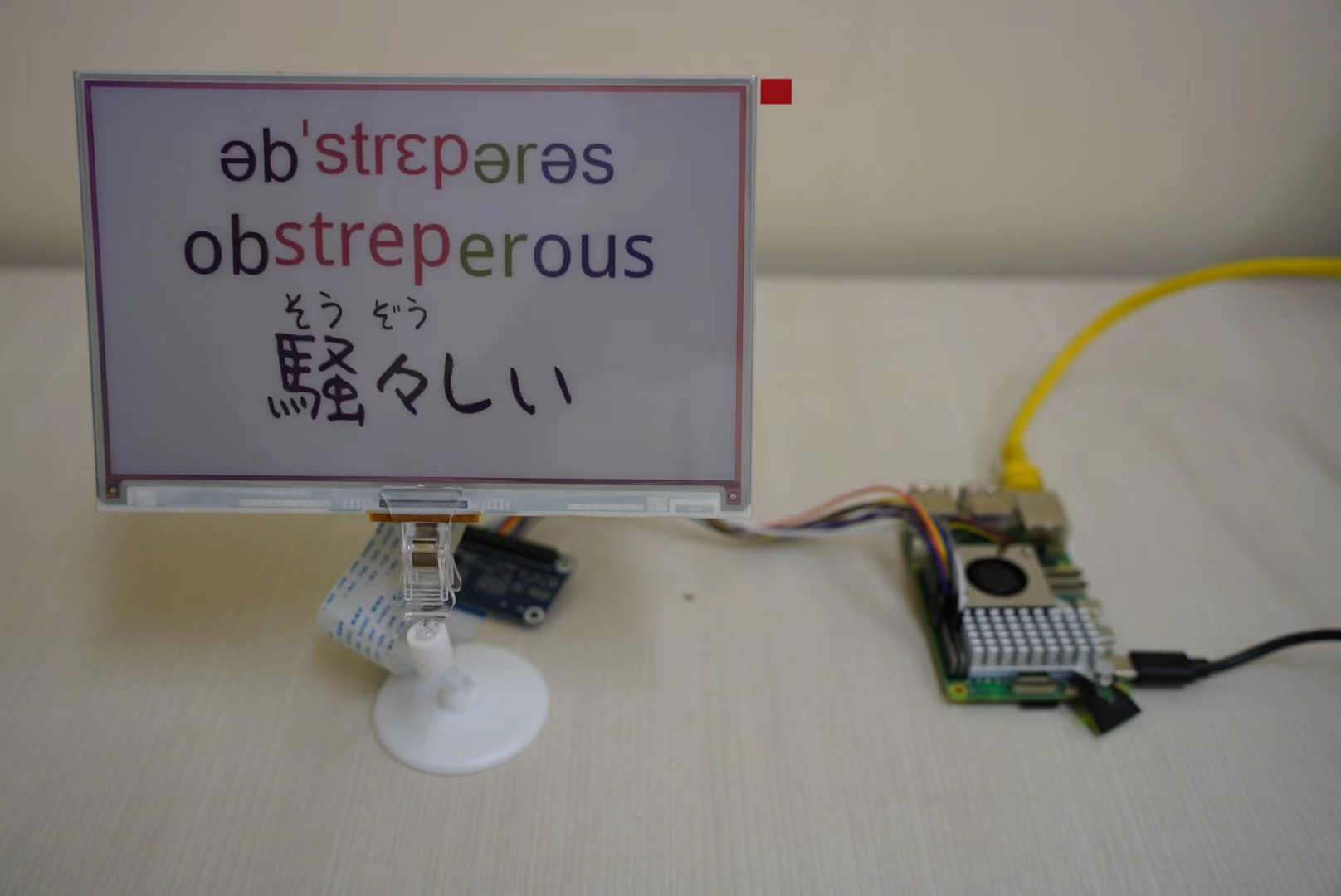
Archive note, September 2026: This prototype used the now-discontinued Waveshare 7.3-inch F panel. If you rebuild it with the current E panel, start from the matching driver and test the display before adapting the word-card code.
The original idea was pleasantly small: let a Raspberry Pi prepare a vocabulary card, render the word, phonetics, syllable colors, and a Japanese gloss, then leave the result on a reflective display. E-paper keeps the last image visible without continuous refresh, so it suits information that should be present without demanding attention.
The useful lesson is no longer “buy these parts and run the script.” It is how to separate what the archive demonstrates from what a new build still has to verify.
Table of Contents
Status at a glance
| Question | What the archive shows |
|---|---|
| Was a seven-color word card demonstrated? | Yes. The retained photograph and rendering code support that historical result. |
| Which display did the code target? | The discontinued Waveshare 7.3inch e-Paper HAT (F), through the epd7in3f Python driver. |
| Was Raspberry Pi 5 named by the project? | Yes, but the archive does not preserve the OS image, HAT revision, driver commit, wiring record, or clean-install proof. |
| Is the current 7.3inch e-Paper HAT (E) a drop-in replacement? | Not established. Waveshare gives it a different epd7in3e example, so it needs a separate migration test. |
| Does Local Knowledge Terminal currently drive e-paper? | No. Its browser output works; its e-paper adapter deliberately remains unavailable until a panel and color profile are selected. |
What the archived code did
The main application imported waveshare_epd.epd7in3f, opened a local SQLite word database, and constructed an OpenAI client from the local environment. It prepared an RGB image with Pillow, split phonetic and spelling segments into colors, rendered a Japanese synonym with reading aids, scaled the image to the panel, and sent the buffer to the display.
Its continuous loop selected a word and waited 300 seconds before the next update. The display was cleared and put to sleep only when the application exited. That is evidence of the program’s intended behavior, not evidence of an unattended service, recovery after a power failure, or long-term panel reliability.
The vocabulary fields generated by a language model also require review. Phonetic segmentation, syllable boundaries, Japanese word choice, and readings can all be wrong even when the card looks polished.
What to check before rebuilding
A working photograph is useful, but it cannot recover every detail needed to reproduce the build. The archive does not record:
- the printed revision of the HAT or driver board;
- whether the connection used the HAT header or a cable;
- the Raspberry Pi OS release, kernel, Python environment, or driver commit;
- the exact voltage and power arrangement;
- a dependency lock or clean installation procedure;
- behavior after interruption, network failure, API failure, or a stuck BUSY pin; or
- safe long-running refresh and sleep behavior.
The archived copy also refers to files such as requirements.txt, LICENSE, and a bundled Waveshare library that are not present in that copy. Treat it as design evidence and prototype source, not as a one-command installation.
Exact hardware and current product boundary
The code and copied vendor demo both name the 7.3inch e-Paper (F) driver. Waveshare documents the F panel as an 800×480, seven-color, SPI display. Its manual gives a typical full-refresh time of about 35 seconds and a narrow operating-temperature range; the actual result depends on the board and environment.
Waveshare now marks the F product as discontinued and recommends the 7.3inch e-Paper (E) as an alternative. “Alternative” does not mean “drop-in compatible.” The current E manual uses epd7in3e, while the archive uses epd7in3f. A buyer must not assume that the old image encoding, color constants, initialization sequence, HAT revision, or timing can be reused unchanged.
Migration-first checklist
Before buying or connecting a replacement panel:
- Record the exact product name, SKU, printed HAT revision, and whether it is a HAT or raw panel.
- Read the manual for that exact revision; verify voltage, SPI pins, GPIO mapping, temperature range, and power requirements.
- Start from the matching current vendor driver and static-image demo, not the archived
epd7in3fapplication. - Test one vendor image, then one locally generated 800×480 image, before adding network or model calls.
- Verify the panel’s color conversion rather than reusing the archive’s informal RGB palette.
- Add timeouts and a safe recovery path for the BUSY pin, API failures, and interrupted refreshes.
- Put the panel into the vendor-recommended sleep or power state between updates.
- Rehearse a clean install and record the OS, package versions, driver commit, wiring, power supply, and output photograph.
Only after those steps should the vocabulary pipeline be adapted to the replacement driver.
Relationship to Local Knowledge Terminal
The newer Local Knowledge Terminal (LKT) carries forward the more valuable part of the idea: multilingual terms, meanings, etymology, roots, affixes, historical forms, and source provenance.
For now, its working output is browser-based. E-paper remains a separate adapter that needs a test on the exact panel and color profile.
If you already have a rights-cleared glossary, dictionary, or reading collection and want to test whether it can become cited local cards on a machine you own, read the sample LKT fit report.
References and provenance
- Waveshare: discontinued 7.3inch e-Paper (F) product
- Waveshare: 7.3inch e-Paper HAT (F) manual
- Waveshare’s official `epd7in3f` Python driver
- Waveshare: current 7.3inch e-Paper HAT (E) product
- Waveshare: 7.3inch e-Paper HAT (E) manual
- Local Knowledge Terminal
The 2025 version of this post was a broad “Art of Lazying” project overview. The September 2026 revision narrows it to the photographed e-paper prototype, checks claims against the retained code and vendor documentation, and makes the discontinued-hardware boundary explicit. The original export remains preserved in the blog repository.